Debug
Test a rule before trusting it — see exactly which devices or releases it matches right now, without waiting for it to fire for real.
Permission level: Admin
Where it lives
Admin → Rules → the ▶ (Evaluate) button on any rule's row, or the Evaluate button in its detail panel.
What you see and can do
What opens depends on the rule:
Device-scoped rules (restrictions, and most policies)
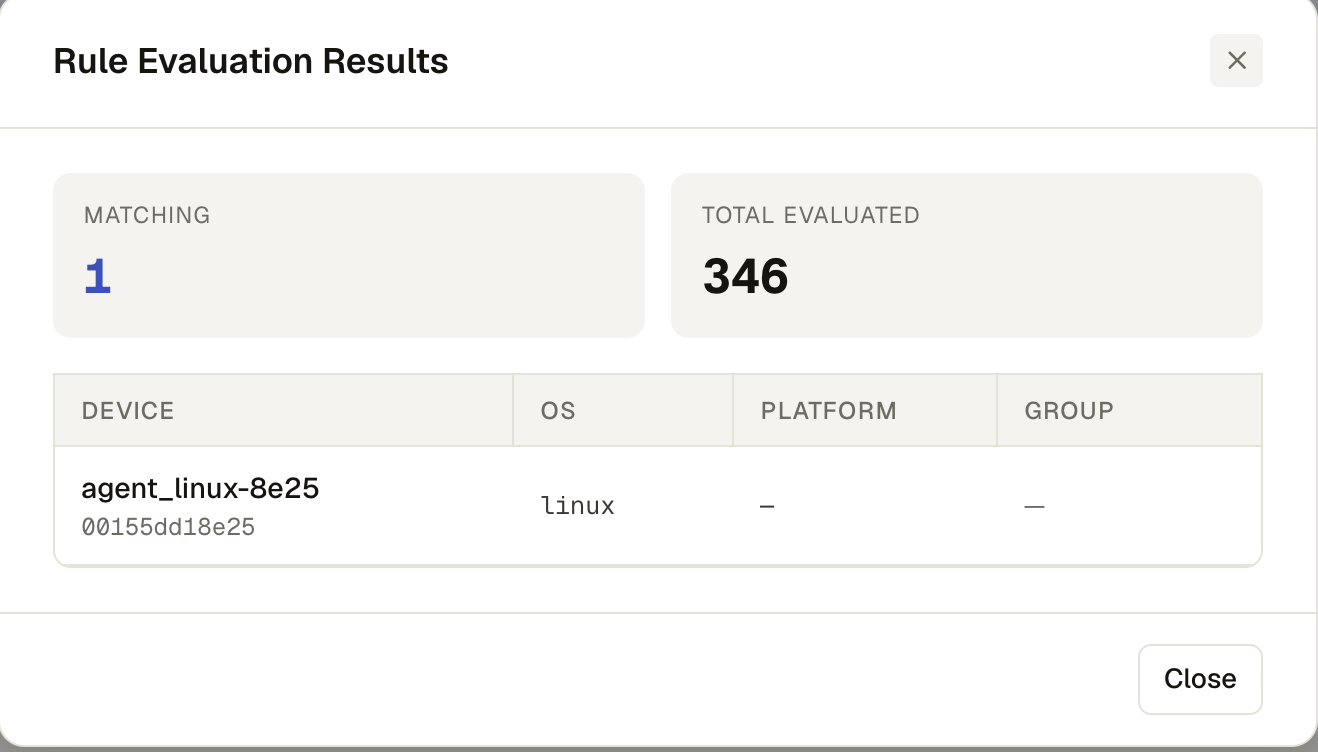
- Matching count vs. Total Evaluated
- A table of every matching device: name/ID, OS, platform, and its groups
- Click a matched device (where a discovery message is available) to expand its raw context — the JSON payload the rule engine evaluated against, fetched on demand
- Long lists are capped at 20 rows with a "+N more devices" note
Version-scoped policies (associated releases)
A release.version / installed.version condition can't match devices — a release isn't a
device — so these evaluate against each associated release instead:
- Applies to devices — the same device-type/OS scope chips the policy would otherwise target
- Matching releases vs. Total Evaluated
- A table of every associated release with a Passes / Blocked result per version