Platform Journal
A live, filterable timeline of everything that's happened to a platform — deliveries, deployments, releases, and system events — across every device it's made of.
Permission level: Admin (read-only for anyone who can open the platform)
Where it lives
Platform Table or Platform Information → ⋯ → Journal (table row) or the drawer's Journal button.
What you see
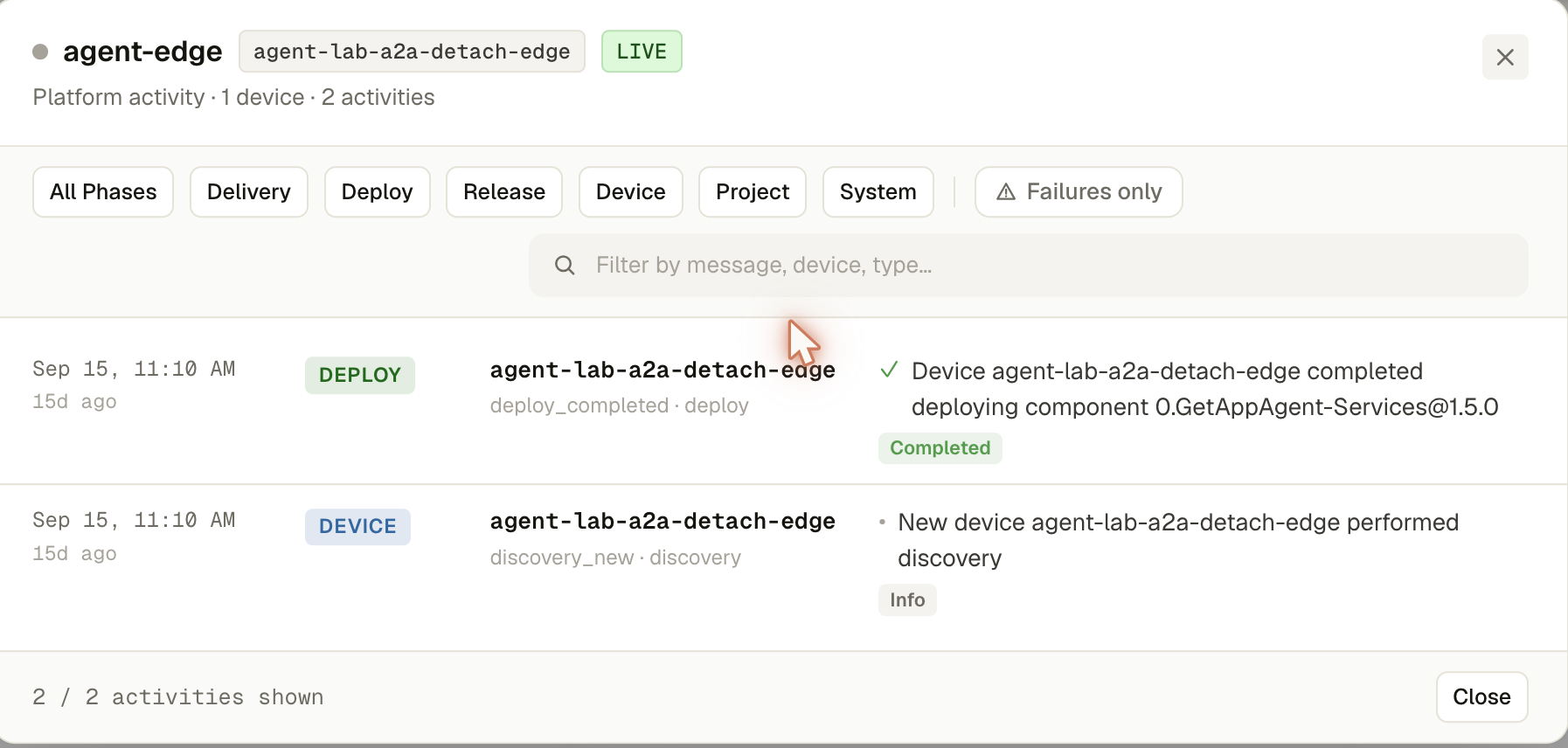
- Header — platform name, ID, a LIVE badge once the activity stream connects, and a running total of activities and failures
- Phase tabs —
All phases/delivery/deploy/release/device/project/system - Each row: absolute + relative timestamp, phase chip, device ID + version (if applicable), type/actor/source, a status icon (spinner while in progress, ✓ on success, a warning glyph on failure), the message, and a status pill
What you can do
- Click a phase tab to filter to just that kind of activity
- Failures only — toggle to see just what went wrong, with a live failure count
- Search — filter by message, device ID, type, version, or actor
- Leave it open — new events push in over SSE and merge into the list live (a
startedentry automatically drops its spinner once a matchingcompleted/failedentry for the same device+catalog+version arrives)