Policies and Restrictions Overview
Introduction
The GetApp platform provides a powerful rules engine that enables you to control software distribution and updates across your device fleet through Policies and Restrictions. These features give you fine-grained control over what software gets deployed where, and when.
What are Policies and Restrictions?
Policies
Policies are rules associated with specific software releases. They control which devices are eligible to receive a particular release based on device characteristics and conditions.
Think of policies as release-level filters that answer the question: "Which devices should receive this software version?"
Key Characteristics:
- Associated with specific project releases
- Evaluated when devices discover available updates
- Can target multiple releases from the same project
- Managed through the Dashboard's project/release management interface
Common Use Cases:
- Rolling out updates to specific device types only
- Testing releases on subset of devices before wider deployment
- Restricting certain releases to devices in specific regions or environments
- Conditional updates based on current software versions
Restrictions
Restrictions are rules associated with devices, device types, or operating systems. They control what software can be installed on specific devices regardless of what releases are available.
Think of restrictions as device-level filters that answer the question: "What software is this device allowed to install?"
Key Characteristics:
- Associated with specific devices, device types, or OS types
- Evaluated by the agent before attempting delivery
- Apply across all projects and releases
- Managed through the Dashboard's device management interface
Common Use Cases:
- Preventing incompatible software from installing on specific hardware
- Enforcing compliance requirements on certain device groups
- Blocking software updates on critical production systems
- Device-specific limitations based on hardware capabilities
How They Work Together
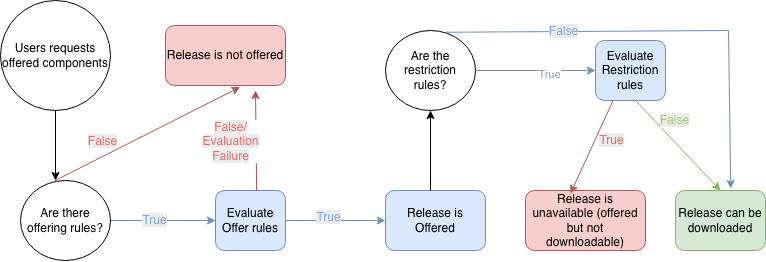
Policies and restrictions work in tandem to provide comprehensive control over your software distribution:
-
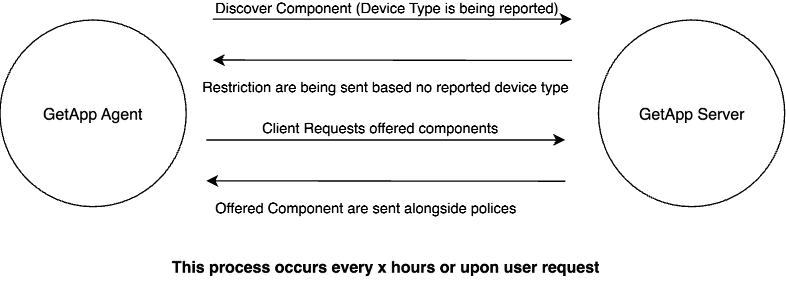
Discovery Phase: When a device checks for available updates, the server evaluates policies to determine which releases match the device's characteristics.
-
Delivery Phase: Before Delivery, the agent evaluates restrictions to verify the device is allowed to install the software.
-
Combined Effect: A release must pass BOTH the policy evaluation on the server AND the restriction evaluation on the device to be delivered.
Rule Engine Foundation
Both policies and restrictions are built on the same underlying rule engine, which provides:
Rule Structure
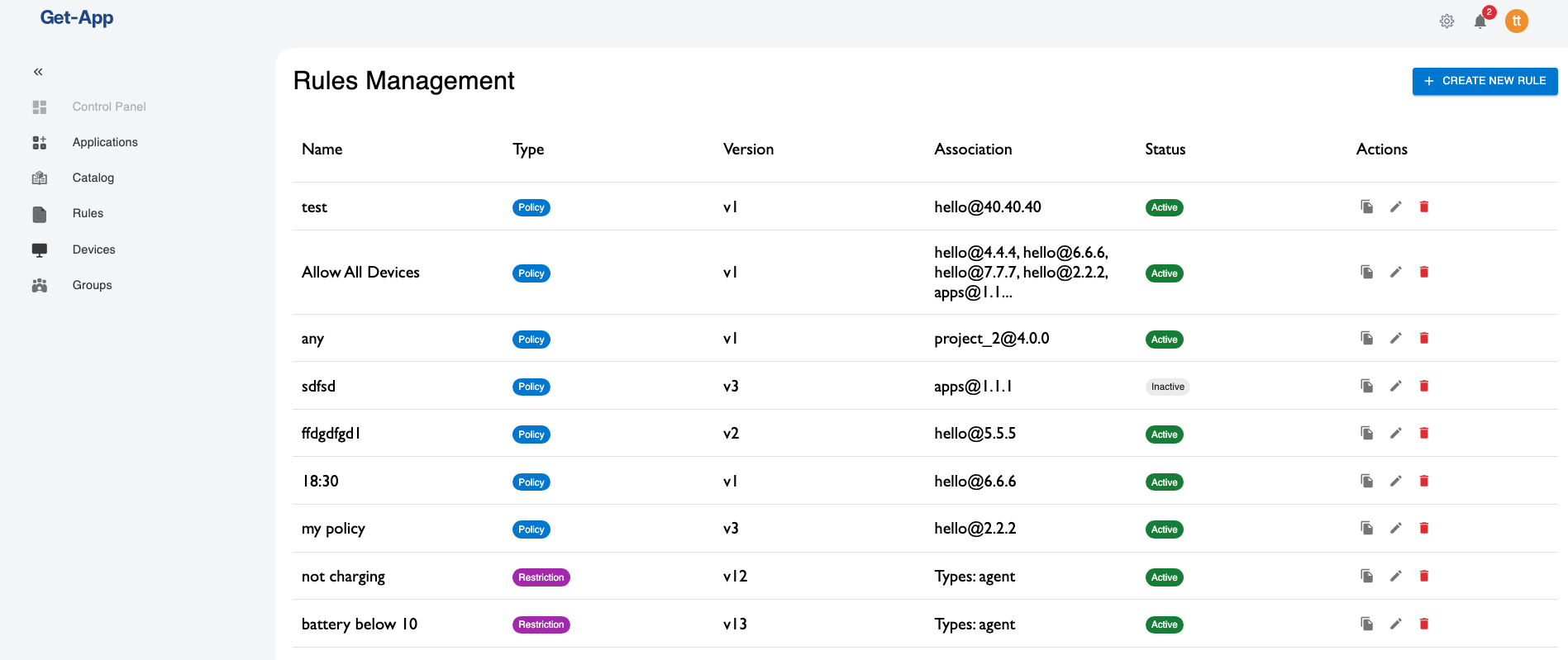
Each rule consists of:
- Name: A descriptive identifier
- Description: Optional explanation of the rule's purpose
- Type: Either "policy" or "restriction"
- Version: Auto-incremented when the rule is modified
- Status: Active or inactive
- Association: What the rule applies to (releases, devices, etc.)
- Rule Expression: The conditional logic that determines if the rule matches
Rule Fields
Rules evaluate device and software properties called fields. Available fields include:
- Device Information:
deviceId,deviceName,deviceType,osType,osVersion - Hardware Details:
cpuArch,memoryMB,diskSpaceGB - Location:
region,site,environment - Software Context:
currentVersion,installedComponents - Custom Fields: Administrator-defined fields specific to your environment
Rule Operators
The rule engine supports various operators for building conditions:
- Comparison:
equals,not-equals,less-than,greater-than,less-than-or-equals,greater-than-or-equals - Logical:
AND,OR,NOT - String:
contains,starts-with,ends-with,matches(regex) - Collection:
in,not-in - Existence:
exists,not-exists
Benefits
Centralized Control
Manage all distribution rules from a single dashboard interface without modifying code or configuration files on individual devices.
Fine-Grained Targeting
Precisely control software distribution based on any combination of device characteristics, software versions, and custom attributes.
Safety and Compliance
Prevent incompatible software installations and enforce organizational policies automatically.
Flexibility
Easily adjust rules as requirements change without redeploying software or updating agents.
Visibility
Track which rules are active, what they're targeting, and their evaluation history.
Architecture Overview
Server Components
Upload Service (Policies)
- Manages policy creation and updates
- Stores policy definitions in the database
- Validates policy rules
- Associates policies with project releases
Discovery Service (Restrictions)
- Manages restriction creation and updates
- Stores restriction definitions in the database
- Validates restriction rules
- Associates restrictions with devices, device types, and OS types
Agent Components
Rules Service
- Downloads applicable policies and restrictions
- Stores rules locally for offline evaluation
- Evaluates rules and returns true if rule is meet or false otherwise
- Enforces rule-based decisions
Policy Evaluation
- Checks if device meets policy criteria for available releases
- Filters out releases that don't match
Restriction Evaluation
- Validates device is allowed to install specific software
- Blocks deliveries that violate restrictions
Dashboard Interface
The Dashboard provides dedicated interfaces for managing both policies and restrictions:
Policies Management
- View all policies associated with releases
- Create new policies with release association
- Edit existing policy rules
- Activate/deactivate policies
- View policy evaluation history
Restrictions Management
- View all restrictions by device, device type, or OS
- Create new restrictions with device association
- Edit existing restriction rules
- Activate/deactivate restrictions
- View restriction evaluation history
Getting Started
To start using policies and restrictions:
- Define Your Requirements: Identify what controls you need over software distribution
- Choose the Right Type: Determine if you need policies (release-level) or restrictions (device-level)
- Identify Available Fields: Review what device and software fields are available for rules
- Create Your First Rule: Use the Dashboard to create a simple rule
- Test Thoroughly: Validate the rule works as expected on test devices
- Monitor Results: Check evaluation logs and device behavior
- Refine as Needed: Adjust rules based on real-world usage
Next Steps
Continue reading the detailed guides:
- Managing Policies - Step-by-step guide to policy management
- Managing Restrictions - Step-by-step guide to restriction management
- Rule Fields and Expressions - Complete reference for writing rules
- Evaluating Rules - Test a rule against your devices before activating it